Hello!
I‘m trying to add a loading screen to my website, which is supposed to disappear once you start scrolling. To do that I have to add a big fixed white rectangle to cover the entire page. Here comes the problem: I cant scroll while the pointer is on this rectangle, which means the animation doesn‘t work.
Does anybody know a work around?
Thanks in advance!
Does anyone have a solution for that?
@christopher.sbh Can you share the website link to check and provide the solution?
Hey the website is: www.christophersiebenhaar.com (PW: test1234!)
you can get rid of the loading screen by clicking but I want it to go away when you scroll
Moin/Servus Christoph,
There is a code solution, which goes like: adding the css value pointer-events: none; to the rectangle / loader elements. which makes them kind of “click through”, so they dont react to the mouse. but the page still scrolls.
Another solution might be to not fix your loaderelements and have them as normal placed elements.
Best from hamburg
Hey, thank you for the quick answer! How would I add that code to the rectangle? I tried adding it into the semantics and under copy pasted it into the CSS Code field but it doesn’t work.
Best!
Christopher
depends on the set up. In your example I cannot see the “preloader” so I cannot investigate it via devtools to tell you what to add to the css panel. could you send me another link to your project in which the preloading animation is shown?
hey sry, it should work now. You can click the preloader in order for it to disappear. But the scroll still doesn’t work
the data-id of your rectangle is “6917a7d7ac706ba2bdbbd26f”. This you can find out via the dev-tools of your browser.
Now to adress this element with the id and change its css values you would paste this into the css panel of the customcode tab:
[data-id=“6917a7d7ac706ba2bdbbd26f”] {

pointer-events: none;

}
thats it…
and make sure, that the white rectangle is large enough! If I change the size of the browser window I sometimes see the page beneath.
hey thank you for the fast reply! I tried to add the code but it didn’t work. Did i do something wrong?
try adding !important to it.
like:
[data-id=“6917a7d7ac706ba2bdbbd26f”] {

pointer-events: none!important;

}
unfortunatly doesn’t work either 
hey… sorry, there was a typo in it… the **“**s were the wrong ones…
Here you go:
[data-id=“6917a7d7ac706ba2bdbbd26f”] {
pointer-events: none!important;
}
It unfortunately still doesn’t work. I might honestly just leave the loading screen out of it. I don’t wanna waste your time either, thank you for helping out! 
One day I’ll figure out how it works.
hey… it should work. but, what I noticed is, that if I copy the codesnippet I posted and paste it inside the css panel the “ somehow are changed to the wrong ones.
so again:
[data-id=”6917a7d7ac706ba2bdbbd26f”] {
pointer-events: none!important;
}
should work. But please manually exchange the “ into the correct ones. (shift +2)
Besides that I would recommend either to add a hint that the user has to scroll down, or to just change it to automatically disappear after 1 or 2 seconds.
It works! Thank you!
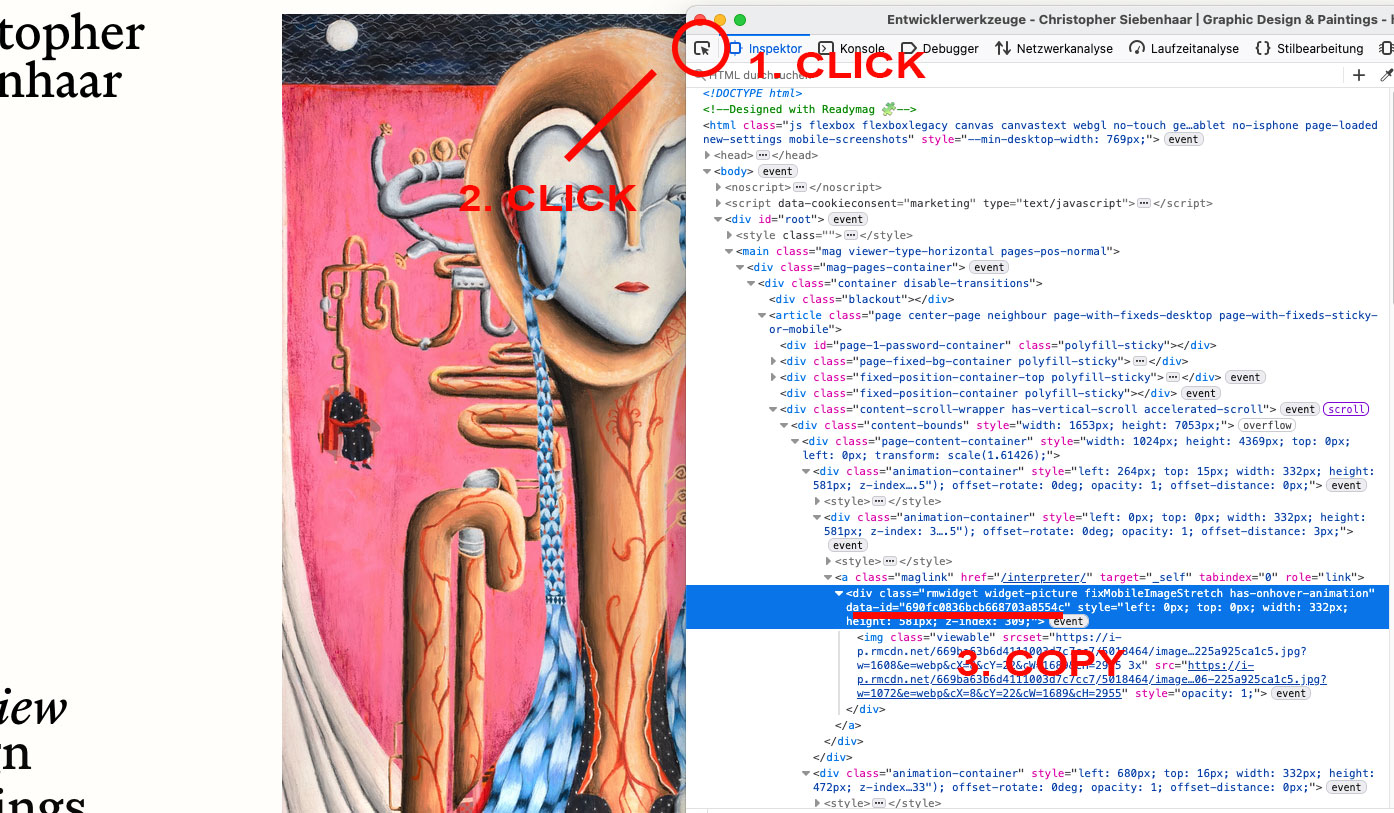
I tried to figure out the data-id for the little video so i can scroll it away too. In the dev tool of the browser I found the code but I have no idea which of the numbers is the video. Could you tell me how to figure that out.
Plus the loader reappears when I scroll back up, I tried to find a way to make it a “One way-scroll” but I dont think its possible.
I’ll annoy you one last time then I’ll leave you alone. Its ok if you’ve had enough too, thank you! You have helped so much already!
here is a little scribble on how to do it:
open up dev tools - click the “inspect” button - click the element - copy the data-id.
To make it only scroll one time would require js code and would be a bit more tricky….
Got it. Thank you so much! :^)